

Today, we will learn a simple and useful tutorial on how to add an attractive and fast-loading Disqus Recent Comments widget on a Blogger blog. Widgets like these let readers know about the conversations going on at your blog, and if you're fairly active, it adds up to a good impression. This widget in question is well-scripted and the JavaScript is hosted at Disqus so as to reduce the load time on your blog. So lets learn how to add it to blogger.
Read more »

 Most of you requested how we created the Most commented widget that shows the list of Top10 most popular posts sorted by comment bubbles. You can see this widget on our sidebar under the heading "Most Discussed". What we did here was using existing script from Yahoo! Pipes that uses json to parse and display each post with highest number of comments posted on it. Using CSS3 pseudo properties, we then styled the comment count with comment bubbles. This widget is simply a copy-paste tool that can be installed within seconds. Lets add this dynamic and fast loading widget to your blogger blogs!
 Today we will discuss various interesting ways of doing effective search in BlogSpot blogs. You will learn how to do
 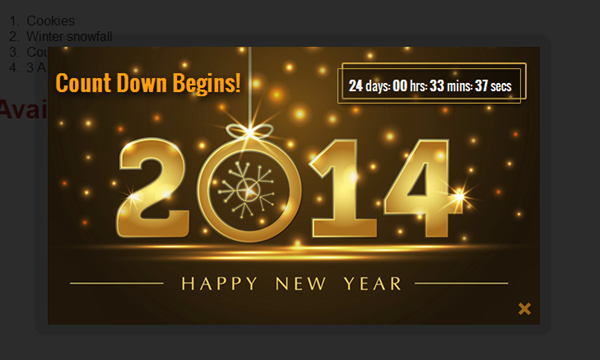 Happy New Year 2014 our beloved readers! How can I forget wishing my family a splendid new year? :D Today marks the sixth consecutive year of serving you all since 2008! That is indeed a long journey for a school going boy to a university graduate and the credit goes to this cute little family that I have online. We wish you all a new year full of abundant new zeal and joy, a year full of honest commitments and a year full of pleasant surprises. May you all have the best in life and I sincerely wish you all the Holy blessings that I wish for myself. You guys are the best! In order to dress up your blogs with beautiful near year greetings, we crafted a new year version of the Christmas jQuery popup we published last week. And guest what? It has the same unique 4 features that not even a premium popup would have! You got us. It is a highly advanced light weight jQuery popup that comes with a default count down or countup timer, comes with 3 animations, Falling snow flakes and most importantly it is fully controlled via
  You can see that we have
  To keep our tradition alive, we are releasing our premium set of jQuery Popups as Holiday gift to all MBT readers. This Popup plugin is specially designed and developed with Five Unique Features! It is completely customizable, has a countdown timer that can be set to any date and time, has 3 different animations, 2 attractive Christmas Background themes and most importantly it is the first popup plugin of its kind introduced for blogger blogs that comes with
  Just today a client requested us that he wish to open all his external links in new window or new tab when clicked and he is not willing to manually do it for each post by adding target="_blank" inside each hyperlink. We wrote down a simple jQuery script that will check all hyperlinks inside your blog pages and will only add the target="_blank" attribute to links which are external links. It wont put any effect to internal links of the blog. The script will only detect external hostnames and the moment it finds one, it will insert into the html a target attribute that tells the browser to open the link in a new window. Thus preventing your blog readers from leaving your blog and also helps in increasing your overall pageviews and bounce rate. We thought we shall also share the script with all of you.
  In our last post we learned the difference between a web cookie and HTML5 Local storage. Now when you are cleared what are the benefits of using HTML5 Local and Session storage methods to store data on a client's browser, lets now learn how to implement these functions to any HTML DOM in Blogspot blogs. This method is not limited to Blogger but can also be used in exact same procedure in Wordpress blogs. Lets learn this interesting new technology with this extremely easy first time guide.
 Blogger is emerging as a powerful opponent to rest of the CMS platforms like wordpress and all. MBT has always created and promoted widgets and plugins for sites on blogger. So as a regular MBT reader myself, I have selected some of the best widgets developed so far for BlogSpot blogs, which I believe every blog must have. We are presenting a collection of 50 handpicked most trending plugins and widgets exclusively for blogger. I bet You can't afford to miss this post! ;)
 Blogger threaded comments are everywhere now and its time you redesign the style and format of your comments. A good blog commenting system helps to build a strong readership and help readers to engage more into discussion. Since 2009 we have been introducing various ways of customizing comment forms on blogger blogs. We introduced
  Update: The Script has been updated and it will work just perfect!
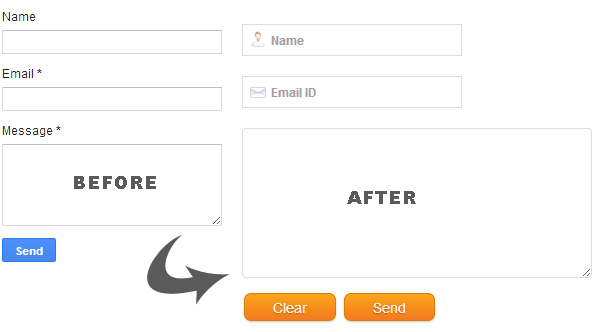 In the first part of our series you learnt how to add a contact Form to your BlogSpot blog and control its display settings. Today you will learn how to change its stylesheet to reflect your custom styles with a more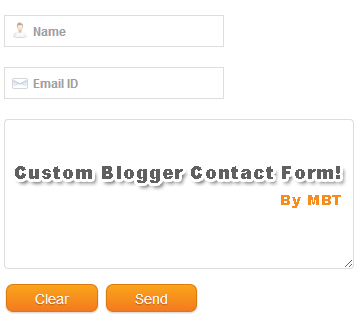
 Today's tutorial will take blogger comment system one step more closer to wordpress commenting engine. I was amazed today when I discovered that
  This is the first plugin of its kind created for websites which share downloadable resources. The plugin amazingly works with all major blogging platforms like wordpress and blogger blogs. It can even be used in static Sites or any CMS you may be using. This tool will count and display download stats whenever a visitor downloads a resource form your site. The data is stored at your firebase free account. Luckily we are amongst very few who have started developing tools using the newly introduced
  This is a great tutorial which will multiply your current click through rate and add a new boom to your over all Adsense earning. With a big repository of plugins for Wordpress blogs like Quick Adsense, WP users never need to worry while adding Adsense to any part of the blog they wish but in blogger we lack plugins that could do the job automatically. Therefore this week my main focus lies in developing more of such plugins that could provide you great front end experience. Thanks our developer Ahmed Nasir the script developed this time will automatically insert your AdSense Ad right after the opening paragraph (Post summary) or the